
Manual Expense Tracking vs Expense Tracker Apps: Which Is Better?
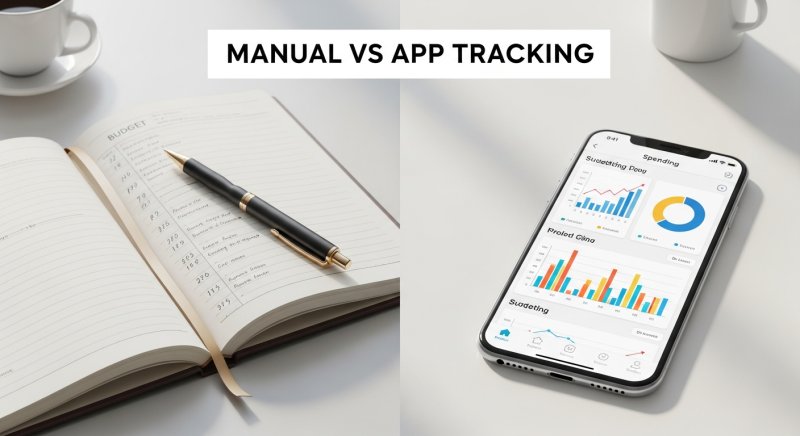
Managing your money starts with one critical habit: knowing exactly where every dollar or rupee goes. Yet, when deciding how to log daily purchases, people often split into two distinct camps. Some prefer traditional manual expense tracking using paper notebooks or physical logs, while others rely on dedicated digital expense tracker apps on their smartphones.
Choosing the right approach depends on your personal habits, technical comfort, and lifestyle. If you are struggling to decide between pen-and-paper logging and mobile software, this guide breaks down the pros, cons, and key differences to help you select the ideal tool for your financial journey.
Understanding Manual Expense Tracking
Manual expense tracking involves physically writing down your transactions in a notebook, journal, or ledger. You collect paper receipts throughout the day and manually calculate your weekly or monthly totals using a standard calculator.
Pros of Manual Tracking
- High Intentionality: Writing down purchases by hand creates a tactile, psychological friction that makes you more conscious of your spending habits.
- Complete Privacy: Physical journals do not connect to servers, eliminating concerns regarding data breaches or app privacy policies.
- Zero Technical Learning Curve: Anyone who can write with a pen can start tracking immediately without needing smartphone updates or internet access.
Cons of Manual Tracking
- Time-Consuming: Logging every transaction manually requires significant time and physical discipline.
- Human Error: Manual math increases the risk of calculation errors, leading to inaccurate totals over time.
- Lack of Instant Insights: Generating visual reports or spending breakdown charts by hand requires hours of effort.
Understanding Expense Tracker Apps
Expense tracker apps are mobile or desktop software applications designed to record, classify, and analyze your personal financial transactions automatically or semi-automatically. They allow you to enter daily expenses in seconds, organize costs into distinct categories, and view instant summary graphs.
For a detailed breakdown comparing desktop software with mobile solutions, explore our guide on Expense Tracker App vs Excel Spreadsheet.
Pros of Expense Tracker Apps
- Speed and Efficiency: Recording an expense takes just a few taps on your mobile screen.
- Automated Reports: Built-in analytics instantly generate visual charts showing your top spending categories.
- Portability: Your expense journal stays with you in your pocket at all times.
Cons of Expense Tracker Apps
- Digital Fatigue: Constant screen notifications can occasionally lead to app burnout.
- Over-Reliance on Automation: Passive tracking without reviewing reports can reduce spending awareness.
Feature-by-Feature Comparison
To choose between physical logs and digital tools, consider how each method handles core financial tasks:
| Feature | Manual Expense Tracking | Expense Tracker Apps |
|---|---|---|
| Setup Speed | Instant (Notebook & Pen) | Quick App Download |
| Data Accuracy | Prone to Math Errors | Automated Precision |
| Spending Insights | Requires Manual Math | Instant Visual Charts |
| Convenience | Low (Must carry paper) | High (Always on smartphone) |
| Debt & Shared Bills | Complex to Maintain | Built-in Tracking Tools |
Which Method Is Right for You?
The best expense tracking method is simply the one you can stick with consistently. If you enjoy mindful, tactile reflection at the end of the day and prefer complete off-grid privacy, manual paper tracking can be immensely satisfying. You might also want to review offline expense tracking benefits and best practices to keep your physical records organized.
However, if you want quick entries on the go, organized categories, clear monthly targets, and instant financial reports, a modern expense app offers far superior efficiency. Knowing how much you should budget for monthly expenses becomes much easier when an app calculates your recurring costs and spending habits automatically.
For users seeking a clean balance between control and convenience, tools like Depto Flow make money management effortless. Depto Flow allows you to track daily income and expenses, organize structured budgets, and maintain clear records of money lent or borrowed alongside pending repayments without overwhelming complexity.
Conclusion
Whether you choose a physical ledger or a smartphone app, tracking your spending is the single most effective step toward financial clarity. While paper notebooks build deep mindfulness, digital apps provide the speed, accuracy, and visual insights needed in modern daily life.
If you are ready to upgrade from manual calculations to a streamlined digital experience, you can download Depto Flow today to easily log expenses, track debts, and take complete control of your monthly budget.